Thursday, July 12, 2012

Happy Birthday, Dear Woody

As old friend Cletis pointed out some months ago, the younger generation doesn't know much about Woody Guthrie.

Here's something you should know: Woody would have turned 100 this coming Saturday. In celebration, NPR has posted a play list of many of Guthrie's songs, sung by Pete Seeger, Bob Dylan, Country Joe (sans the Fish), Old Crow Medicine Show, and may others, including Woody Guthrie.

Give it a listen.

Tuesday, May 22, 2012

The Stalker Trilogy

As a teenager I loved the first two of these songs. But put back-to-back-to-back, there is a rather disturbing progression.


The Association Cherish (1966)


The Temptations Just My Imagination (Running Away With Me) (1971)


The Police Every Breath You Take (1983)

Saturday, September 10, 2011

Recording with PulseAudio

Sometimes I find that I want to record the sound coming out of Hal's speakers. Say that my automatic recording of Prairie Home Companion goes south because an earthquake/hurricane/remnants of a tropical storm knocked out my power. It would be nice to be able to go the Prairie Home web site, click on the archive for the show, play the streaming download and record it.

I've done this kind of thing for years, mostly without the earthquakes. Occasionally there have been problems, but it's always possible to find a solution. After which I write it down so that I'll remember how to fix things.

Except sometimes my notes aren't helpful, because somebody decided it was a good idea to change things. Take a look at the above link. To be able to record sound, I'm suppose to open Gnome's Sound preferences, click on Recording, and click on Capture. Let's look at gnome-volume-control as it's shipped with Ubuntu 11.04:
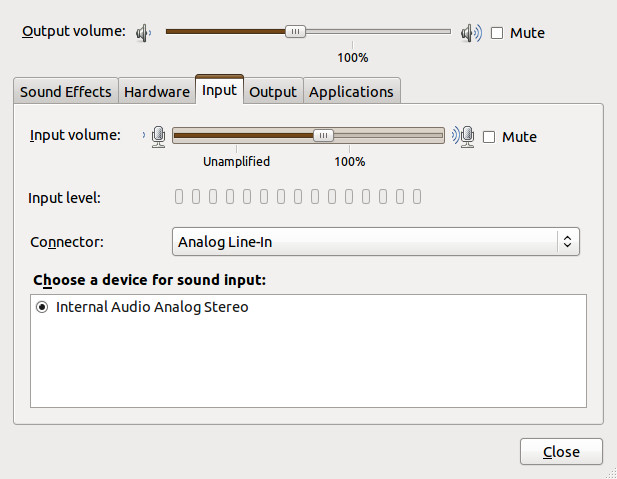
Gnome Sound Preferences

Looks nothing like what was described above, does it?

So what happened? Beats me. All I know is that someone changed things, and that the changes have something to do with PulseAudio, Ubuntu's choice for sound.

Fortunately, there is a Ubuntu Wiki article that solved things for me. Of course, the information you want is buried way down at the bottom of the article, so let me summarize it here, down at the bottom of this article. (Yes, I admit to being long-winded.)

First, you need to set up the PulseAudio volume control. For reasons known only to Mark Shuttleworth, this isn't installed by default in 11.04, and goes by the perfectly obvious name of pavucontrol. So install it first,

sudo apt-get install pavucontrol

and open it, either by typing pavucontrol from the command line or clicking "PulseAudio Volume Control" under Applications=>Sound & Video. You'll get something like this:

PulseAudio Volume Control (pavucontrol)

Not very helpful, is it? The problem is that there is no application open trying to record sound. So let's open up Gnome Sound Recorder:
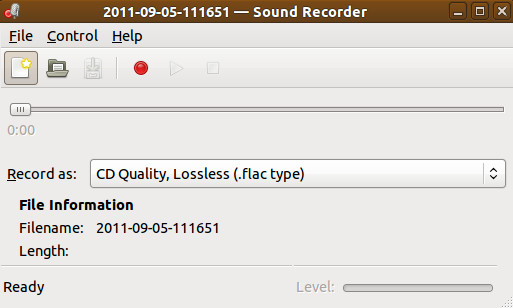
Gnome Sound Recorder (with nothing recording)

Start something playing, and press Record. PulseAudio will now look something like this:

Pulse Audio Volume Control with Gnome Sound Recorder Operating

The key to making things work is the line that says:

Sound Recorder: Record Stream from: …

You may have several options, but what you want is Monitor of Internal Audio Analog Stereo. When this is selected Gnome Sound Recorder will record what's coming out of the speakers, and will look something like this:

Gnome Sound Recorder recording

You can see it is recording as the brown (surprise!) bar at the bottom moves in time with the music's volume.

We'll leave the rest of this, e.g., recording directly to .ogg or .mp3, converting from .flac to .ogg, using Audacity instead of Sound Recorder, etc., as an exercise for the reader. Just remember, to record sound with Ubuntu 11.04, you need to use Pulse Audio Volume Control to tell whichever application you are using to record to monitor the internal audio.

Until someone decides it's time for a change.

Sunday, July 31, 2011

Almost Spot On

I'm currently listening to The Essential Kansas, the 70's boy band (I jest) from Topeka. For some reason, I've never bought a Kansas album, and I don't plan to in the near future. Yet I'm listening completely legally, and not paying a dime.

That's because Spotify has finally made it from Europe to the U.S. I read about it in a New York Times article (I just access the free stuff there, too) the other day and decided to try it out. As far as I can tell, the deal is:

  • With a free-as-in-beer account, you can stream any song in Spotify's vast library (and it's vast, if somewhat uneven).
  • For now, you can listen to an unlimited amount of music, only interrupted by two minutes of commercials any hour.
  • After six months, your free account is limited to ten hours of music per month. I read that in the NYT article, good luck in finding it in Spotify's account description.
  • Of course, there are other plans that let you stream unlimited amounts of music, without ads, for a price.
  • You have to use Spotify's music player.

That last part was almost a deal breaker. (Can you break a free deal?) There is no generally available Linux client. There is an alpha version of a Linux player, but it doesn't seem to have been worked on for a year or so, and it can only be used with the paid accounts, because we haven't found a reliable way to display ads yet.

However, the Windows client runs under Wine, and Spotify gives detailed instructions on how to get it started. You can't play your local MP3 files through Spotify (not sure I'd want to), but the stuff that comes over the web sounds good — according to the NYT article, it's in 160-kbps Ogg Vorbis format.

All right, how is it? Funny you should ask.

The sound quality is good enough for my speakers-in-the-monitor setup. Beyond that I couldn't say. Audio purists will probably find some fault, but the real purists are listening to vinyl anyway. The playlist is extensive, but not complete. OK, I didn't expect the Beatles here, but the Eagles are mostly missing. You do get what seems to be complete coverage of the Rolling Stones, Simon & Garfunkel, Creedence Clearwater Revival, Bob Marley, Peter, Paul & Mary, the Mommas and the Papas, the aforementioned Kansas, Roger Miller, Glen Campbell, Johnny Cash, a limited amount of Dylan, and even Hugh Laurie reading Three Men in a Boat. They have what seems to be the complete Jimmie Rodgers the Elder, but I can't find anybody's version of Jimmie Rodgers the Younger's classic ballad It's Over. This would frustrate me if I was actually paying for this stuff, but since it's all free I really can't complain. It seems as though they're working on it.

Oh yes, one more thing: if you want to sign up for the free account, you need an invite. Apparently paid-for account holders can give you an invite, or you can go to Spotify.com and ask for one. It took about thirty seconds for me to get an email after I asked, but YMMV.

All in all, it seems to be a pretty good service, at least for now. If you put a map of the continental U.S. on a dartboard so that Kansas is the bull's eye, Spotify's dart hits at about Oklahoma City. Add the Eagles, more Dylan, and the Beatles (Ha!), and they can hit Holyrood.

Saturday, August 08, 2009

You stick around now it may show

Forty years ago, on this very day, the Beatles shot the cover picture for Abbey Road.

The crosswalk is still there. A few years ago somebody at the Abbey Road Studio had the bright idea of pointing a web cam at:

http://www.abbeyroad.co.uk/visit/

Found via the New York Times newsfeed.

(Hey, you got a better lyric for the title, add it to the comments.)
